Here is something most people do not realize about computers: they are not smart. They cannot figure things out on their own, they do not understand common sense, and they will follow your instructions exactly — even if those instructions are wrong. A computer will happily add two numbers in the wrong order, repeat a task forever, or divide by zero and crash — because that is what you told it to do. Computer science is the study of how to give computers good instructions. It is the discipline of thinking so clearly and precisely that a machine — which has no judgment, no intuition, and no common sense — can still carry out exactly what you intended. That turns out to be one of the most useful and powerful skills in the modern world. Not because everyone becomes a programmer, but because learning to think like a computer scientist makes you better at solving every kind of problem.
1. Why Does This Matter?
Software runs almost everything — and the people who understand how to build it shape the world.
- Every app, website, and video game is built from code
- Medicine, climate science, and finance all depend on computation
- Understanding CS helps you be a creator, not just a consumer of technology
- Computational thinking improves problem-solving in every field
- The fastest-growing, highest-paying careers are in tech
2. What Is Computer Science?
CS is the study of algorithms, data, and computation — not just programming, but the underlying ideas that make programs work.
- Algorithm: a step-by-step process for solving a problem
- Data structures: ways to organize information efficiently
- Programming: translating an algorithm into code a computer runs
- Abstraction: hiding complexity so you can think at a higher level
- Systems: how hardware and software work together
3. A Brief History of Computing
Computing began with mathematics, not machines — and has transformed civilization in less than a century.
- 1840s: Ada Lovelace writes the first algorithm
- 1936: Alan Turing defines computation mathematically
- 1940s: First electronic computers fill entire rooms
- 1970s: Personal computers emerge for everyday use
- 1990s: The internet connects the world
- 2007: Smartphones put a computer in every pocket
4. How Computers Think
At the core, every computer does just three things: store data, process it, and move it around.
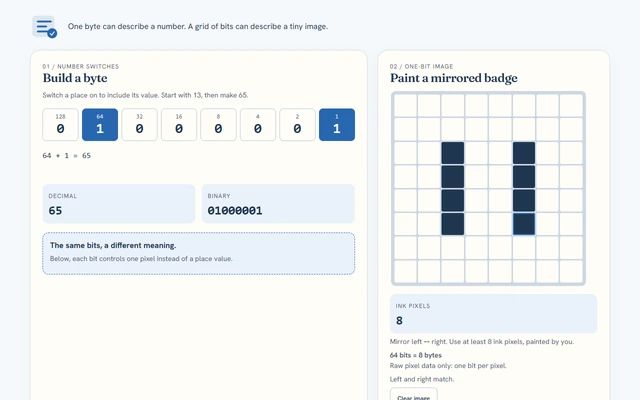
- Binary: everything is stored as 0s and 1s
- CPU: the processor that executes instructions
- Memory: short-term storage where active data lives
- Storage: long-term storage that persists when power is off
- Input/Output: how the computer receives and sends information
5. Computational Thinking
Four habits of mind that let you solve problems like a computer scientist.
- Decomposition: breaking a big problem into smaller pieces
- Pattern recognition: finding similarities and repeated structures
- Abstraction: ignoring irrelevant details, focusing on what matters
- Algorithm design: creating a step-by-step solution that works every time
6. Core Areas of Computer Science
CS covers more than coding — it spans algorithms, networks, artificial intelligence, security, and more.
- Algorithms & Data Structures: the backbone of efficient software
- Networks & the Internet: how devices communicate globally
- Artificial Intelligence: teaching computers to learn and reason
- Cybersecurity: protecting data and systems from attack
- Human-Computer Interaction: designing software people can actually use
7. CS in Action
Real-world examples of computer science solving real problems.
- GPS navigation: algorithms find the shortest route in milliseconds
- Spotify recommendations: machine learning predicts what you will like
- Weather forecasting: simulations model the atmosphere at enormous scale
- Online shopping: databases store and retrieve millions of products instantly
- Video calls: compression algorithms shrink data so it travels in real time
8. Fast vs. Simple
In CS, optimizing for speed often means sacrificing simplicity — and vice versa.
9. Programming vs. Computer Science
Programming is a tool of CS — but computer science is the broader study of computation itself.
10. Beginner Mistakes
Common traps that new computer science learners fall into.
- Memorizing code without understanding the logic behind it
- Giving up when a program does not work on the first try — debugging is normal
- Ignoring efficiency: code that works but is way too slow
- Copy-pasting solutions without understanding them
- Thinking there is only one right way to solve a problem
11. How to Learn CS Well
The habits that separate students who develop lasting CS skills from those who only skim the surface.
- Build things: the best way to learn is to make projects you care about
- Read other people's code: it is like reading to improve your writing
- Debug systematically: isolate the problem, form a hypothesis, test it
- Learn the fundamentals deeply before jumping to frameworks
- Teach what you know — explaining forces real understanding
12. Try It: Your First Algorithm
Write an algorithm — in plain English — to find the largest number in a list.
- Start with the first number; call it "current max"
- Look at the next number
- If it is larger than current max, it becomes the new current max
- Repeat until you have looked at every number
- The current max at the end is the answer
13. What We Covered
Computer science is the study of algorithms, data, and computation — and computational thinking is a skill that applies everywhere.
Mastery quiz
- This class says computer science has four big branches. Which set lists them correctly?
- Algorithms, data, programming, and systems
- Typing, clicking, scrolling, and saving
- Math, science, art, and music
- Phones, laptops, tablets, and servers
- What does abstraction mean in computer science, according to the class?
- Hiding complex details so you can think at a higher level
- Making code run as slowly as possible
- Memorizing code without understanding it
- Storing information on a hard drive
- The class lists the four habits of computational thinking. Which one means breaking a large problem into smaller, manageable pieces?
- Decomposition
- Pattern recognition
- Abstraction
- Algorithm design
- In the 'Fast vs. Simple' tradeoff, the class says you should use a hash table instead of a simple loop when you need to:
- Look up a name among a billion users millions of times per second
- Find a name in a list of only ten people
- Make the code easier for beginners to read
- Store information after the computer is turned off
 01
01 02
02 03
03 04
04 05
05 06
06 07
07 08
08 09
09 10
10 11
11 12
12 13
13 14
14 15
15 16
16 17
17 18
18 19
19 20
20 21
21 22
22 23
23 24
24 25
25 26
26 27
27 28
28 29
29 30
30